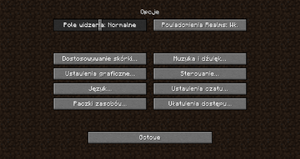
Opcja ta, znana również jako "pole widzenia", pozwala określić, jak duża część okolicy jest widoczna na ekranie. Możliwe jest ustawienie od 30° do 110° (Quake Pro).
Poziom trudności
Pozwala zmienić poziom trudności i (od wersji 1.8) ewentualnie zablokować, by nie można było go zmienić.
Dostosowywanie skórki
Opcja dostosowywania postaci
Opis
Peleryna
Pozwala włączyć/wyłączyć pelerynę.
Kurtka
Pozwala włączyć i wyłączyć drugą warstwę tułowia.
Prawy i lewy rękaw
Pozwala włączyć albo wyłączyć drugą warstwę rąk.
Prawa i lewa nogawka
Pozwala włączyć lub wyłączyć drugą warstwę nóg.
Kapelusz
Pozwala włączyć/wyłączyć drugą warstwę głowy.
Główna ręka
Opcja dodana w 15w31a. Pozwala ustawić główną rękę gracza - domyślnie jest to prawa ręka.
Naciśnięcie przycisku "Super Secret Settings" (pl. Super Tajne Ustawienia) spowoduje zmianę wyglądu otoczenia. W wersji 15w31a zostały usunięte.
Muzyka i dźwięk
Ustawienia dźwięku
Opis
Głośność ogólna
Ustawia głośność wszystkich dźwięków.
Muzyka
Opcja umożliwiająca ustawienie głośności muzyki podczas rozgrywki.
Głośność pogody
Umożliwia ustawienie poziomu głośności burzy i deszczu.
Wrogie moby
Ustawienia głośności dźwięków wydawanych przez wrogie i neutralne moby.
Gracze
Głośność dźwięków, które wydają gracze.
Bloki dźwiękowe
Ustawienia dźwięków bloków dźwiękowych i szaf grających.
Bloki
Opcja umożliwia ustawienia głośności różnych bloków.
Pasywne moby
Ustawienia odgłosów mobów pasywnych i oswojonych.
Otoczenie/Środowisko
Dźwięki jaskiń i fajerwerków.
Ustawienia graficzne
Ustawienia graficzne
Opis
Grafika
Opcja Dokładna włącza efekty graficzne wyższej jakości. Szybka opcja grafiki wyłącza te efekty.
Odległość renderowania
Opcja ta pozwala ustawić, ile chunków ma gracz w zasięgu wzroku. Im mniejsza liczba takich stref, tym wyższe FPS.
Uwaga: średnica = promień × 2 + 1
Nazwa
Pole widzenia (promień)
Łączna liczba
Bloki
Chunki
Sekcje
32 chunki
512
4225
67,600
31 chunków
496
3969
63,504
30 chunków
480
3721
59,536
29 chunków
464
3481
55,696
28 chunków
448
3249
51,984
27 chunków
432
3025
48,400
26 chunków
416
2809
44,944
25 chunków
400
2601
41,616
24 chunki
384
2401
38,416
23 chunki
368
2209
35,344
22 chunki
352
2025
32,400
21 chunków
336
1849
29,584
20 chunków
320
1681
26,896
19 chunków
304
1521
24,336
18 chunków
288
1369
21,904
17 chunków
272
1225
19,600
16 chunków
256
1089
17,424
15 chunków
240
961
15,376
14 chunków
224
841
13,456
13 chunków
208
729
11,664
12 chunków (domyślne)
192
625
10,000
11 chunków
176
529
8464
10 chunków
160
441
7056
9 chunków
144
361
5776
8 chunków
128
289
4624
7 chunków
112
225
3600
6 chunków
96
169
2704
5 chunków
80
121
1936
4 chunki
64
81
1296
3 chunki
48
49
784
2 chunki
32
25
400
Smooth Lighting
Lighting is smoothed across the blocks (ambient occlusion), or each block has a distinctive light level. This setting does not change the gameplay in any way, but it has a slight effect on performance.
Max Framerate
Limits the FPS. Normally limiting it to 60 Hz (60 FPS) is the best option, as setting it higher results in frames being drawn that you will not see, overworking the GPU, and slowing the loading of chunks.
Toggles the "bobbing" motion of the camera as the player is walking. Disabling it may increase performance.
GUI Scale
Controls the GUI (Graphical User Interface) scale. This also controls the HUD (Heads Up Display) size. Using the "Auto" GUI scale can set the normally un-obtainable "Larger" GUI scale, if playing with a large resolution.
Clouds
Fancy causes the clouds to be rendered in 3D.
Fast causes the clouds to be rendered flat.
OFF causes no clouds to be rendered.
Brightness
Dims down or lights up the game's surfaces, even if fully dark. It has no effect on gameplay, it is only a visual effect. Works in any dimension and affects the Night Vision status effect.
Particles
Allows particles effects such as sprinting particles, falling particles and particles from lava and water drips. Block breaking particles are not affected. In "Minimal" particle setting, rain is silent and hearts appearing around mobs in Love Mode do not appear.
Fullscreen
Puts Minecraft into Fullscreen mode, keeping it off keeps it in a window. Can also be changed with F11.
Use VSync
Limits your frames per second to the screen's refresh rate, which is usually 60 Hz, 75 Hz on some CRT screens, or 120 to 144 Hz on some gaming-targeted screens. Enabling VSync fixes tearing, but increases input latency and causes stuttering if one's computer cannot draw enough frames per second.
Mipmap Levels
The higher the level, the more the textures look "smooth".
Alternate Blocks
Toggles alternate block models. When turned off, the least complex highest priority model will always be used. As of 15w31aSzablon:Upcoming, this is no longer an option.
Use VBOs
Toggles vertex buffer objects.
Entity Shadows
Determines whether entities will display simple shadows.
Pozwala graczowi wybrać język, którym posługiwać ma się gra.
Opcja
Opis
Wymuś czcionkę Unicode
Włącz czcionkę Unicode wyłącz czcionkę Unicode
Ustawienia czatu
Option
Description
Chat
Shown enables your ability to see the chat on a server. Commands Only allows you to only see the output of commands in the chat. Hidden hides the chat on all servers.
Colors
ON allows you to see the chat in many different colors. OFF disables this function and only allows you to see the chat in a light gray color.
Web Links
ON allows you to see URLs and other links in the chat. OFF disables this function and blocks all URLs and other links.
Opacity
The opacity of the chat.
Prompt on Links
ON forces a prompt to appear on your screen whenever you click on a URL to makes sure that you wish to exit Minecraft and head to the website. OFF turns the prompt off.
Scale
How large the chat is shown.
Focused Height
The max height that the chat is allowed to appear when in focus (chat input and history open).
Unfocused Height
The max height that the chat is allowed to appear normally (chat input and history closed).