
Szablon:Schematic/opis
 | | | |
[Pomoc: Schematy]
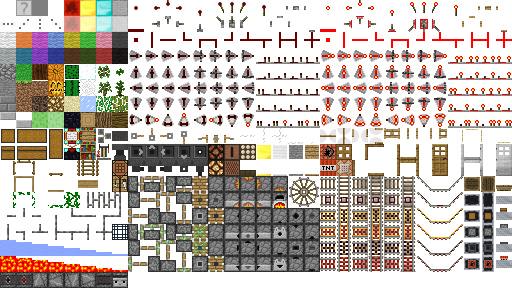
This template displays a grid of block sprites to symbolically represent a Minecraft structure (primarily redstone circuits and mechanisms).
Usage
Schematic uses unnamed parameters to define the sprites used in the schematic, and named parameters to modify the schematic's default appearance:
{{Schematic
|caption=<caption>
|captionstyle=<captionstyle>
|clear=<clear>
|float=<float>
|size=<size>
|style=<style>
|tablestyle=<tablestyle>
|<param1>|<param2>|…
}}
- caption
- The optional caption parameter may be added to create a caption under the schematic. Adding a caption automatically also creates a box surrounding the schematic and caption, and floats the box to page right. The redstone style guide recommends adding
{{Schematic help}}at the end of the caption of the first schematic in an article (and to others if helpful), which adds a standardized link to the schematic help page.
- captionstyle
- The optional captionstyle parameter may be added to change the appearance of the caption area and contents. Its value should be a css declaration or declaration group with no surrounding braces or quotes (e.g.,
captionstyle=color: red; text-align: center;). This parameter has no effect if caption and float are not specified.
- clear
- The optional clear parameter may be added to force the schematic to drop below other floated elements. Its value may be
left(to drop below only left-floated elements),right(to drop below only right-floated elements),both(to drop below all floated elements), ornone(the default).
- float
- The optional float parameter may be added to change the side to which the schematic floats if a caption is added. The only value recognized is
left-- anything else defaults back to floating to the right.
- A schematic with no caption or float parameters acts like any other wiki table, ending the previous line and pushing subsequent text to a new line.
- size
- The optional size parameter may be added to specify the width and height of the sprite cells in pixels. Its value should be a simple number with no units added (e.g.,
size=16). If omitted, size defaults to 32.
- style
- The optional style parameter may be added to change the appearance of the schematic's surrounding box. Its value should be a css declaration or declaration group with no surrounding braces or quotes (e.g.,
style=background-color: yellow;). This parameter has no effect if caption and float are not specified.
- tablestyle
- The optional tablestyle parameter may be added to change the appearance of the schematic table. Its value should be a css declaration or declaration group with no surrounding braces or quotes (e.g.,
tablestyle=background-color: green;).
- param
- The param parameters specify the content of the schematic. When multiple params are defined, the resulting sprites or text are displayed in individual table cells, one after the other, unless a plus sign is used to stack them in the same cell.

- A sprite identifier (see list below) displays a sprite from the image on the right.
- A plus sign (
+) indicates that the next parameter should be stacked on top of the previous parameter, rather than starting a new cell. - A dash (
-) starts a new row. - Anything else is simply displayed as center-aligned text within the cell's bounding box (empty parameters or whitespace parameters are displayed as empty cells).
- Overflow text is not displayed, so this is primarily intended to be used to display one or two characters in a schematic (such as input and output locations, feature markers to be referenced in text, numbers representing light levels or distance, etc.).
- HTML character entity references may be needed for some characters, such as
|for the pipe character:|,=for an equals sign,+for a plus sign (to be displayed as text rather than stacking the next param), or-for a dash (to be displayed as text rather than starting a new row).̅after a letter will provide a "combining overline" over the letter (used to indicate an inverse signal such as Q̅).
Considerations
Overuse of the schematic template can create a high server load, resulting in long page generation times or even a time-out failure. This server load is proportional to the number of schematic cells on a page (for example, one 100-cell schematic and ten 10-cell schematics produce roughly the same server load). When the number of schematic cells on a page start to exceed a few hundred (or fewer, with other high-load templates), consider using {{LoadBox}} or {{LoadPage}} to offload some or all schematics into user-requested subpages.
List of identifiers
A sprite identifier is a string of characters that specify which sprite to display.
Some conventions to remember:
- Directions are indicated by
n(north),s(south),e(east),w(west),u(up), andd(down). Directions are relative to the schematic, not the Minecraft world. $indicates a side view sprite.!indicates a powered/activated component.
Szablon:LoadPage Szablon:LoadPage
See Also
- Help:Schematic
- Guide to reading wiki schematics
- Redstone style guide
- Guide to writing wiki articles about redstone structures, including tips for authoring schematics